> ## Documentation Index
> Fetch the complete documentation index at: https://docs.useresona.com/llms.txt
> Use this file to discover all available pages before exploring further.
# Chat with Library
> Ask Your Library — conversational AI that knows everything you've saved
# Chat with Library
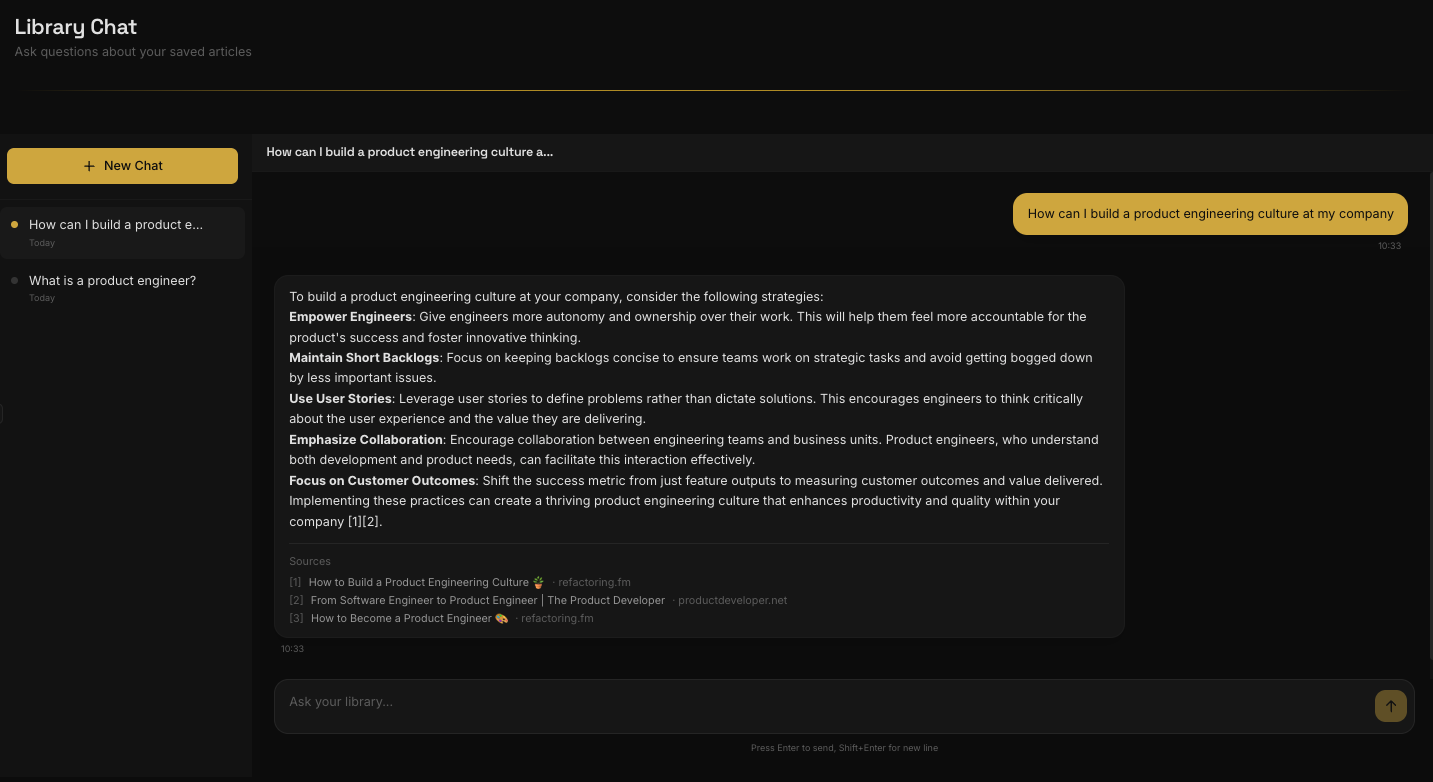
Ask Your Library is Resona's conversational interface — chat with an AI that has read and understood every article you've saved.
**Your personal research assistant.** Unlike generic AI chatbots, Ask Your Library only draws from your saved content, giving you answers grounded in sources you trust.
 ## What You Can Ask
"What did I save this week?" or "Summarize my articles about productivity"
"What patterns do you see in my reading?" or "How do these topics relate?"
"What article talked about remote work?" or "Find that piece about habit formation"
"What are the common themes across my leadership articles?"
## Example Conversation
**You:** What patterns do you see across my recent saves?
**Resona:** Looking at your last 10 articles, I notice two recurring themes:
1. **Async communication** — Several articles discuss working effectively without real-time interaction
2. **Deep work** — Multiple pieces emphasize focused, uninterrupted work time
Interestingly, "Building Remote Teams That Actually Work" and "How Jazz Bands Improvise Together" both explore coordination without visual cues — a connection you might not have noticed.
**You:** What was that article about the 80/20 rule?
**Resona:** You saved "The Pareto Principle in Practice" on November 3rd. The key insight was that 80% of results come from 20% of efforts — and the article suggested auditing your tasks weekly to identify high-leverage activities.
\[View article →]
**You:** Based on everything I've saved about writing, what advice comes up most often?
**Resona:** Across your 8 writing-related articles, the most consistent advice is:
1. **Write daily** — Every article emphasizes consistency over inspiration
2. **Edit separately** — Don't edit while drafting; separate the creative and critical phases
3. **Read widely** — Good writers are voracious readers
The strongest source for these principles is "On Writing Well" by William Zinsser, which you saved in September.
## How It Works
1. **Save articles** — Every article you save is processed and indexed
2. **Embeddings created** — AI converts your content into semantic representations
3. **Context-aware search** — When you ask a question, relevant articles are retrieved
4. **Grounded responses** — Answers are generated using only your saved content
Resona never hallucinates information. If the answer isn't in your library, it will tell you.
## Tips for Better Results
| Instead of... | Try... |
| -------------------------------------- | -------------------------------------------------------------- |
| "Tell me about AI" | "How is AI changing product development?" |
| "What's the best productivity system?" | "How can I build a product engineering culture at my company?" |
| Vague questions | Specific questions about concepts you're exploring |
## Message Limits
Chat is available to all users. Free accounts have a monthly message limit to ensure fair usage. Upgrade to Pro for unlimited conversations with your library.
| Plan | Monthly Messages |
| ---- | ---------------- |
| Free | 10 messages |
| Pro | Unlimited |
## What You Can Ask
"What did I save this week?" or "Summarize my articles about productivity"
"What patterns do you see in my reading?" or "How do these topics relate?"
"What article talked about remote work?" or "Find that piece about habit formation"
"What are the common themes across my leadership articles?"
## Example Conversation
**You:** What patterns do you see across my recent saves?
**Resona:** Looking at your last 10 articles, I notice two recurring themes:
1. **Async communication** — Several articles discuss working effectively without real-time interaction
2. **Deep work** — Multiple pieces emphasize focused, uninterrupted work time
Interestingly, "Building Remote Teams That Actually Work" and "How Jazz Bands Improvise Together" both explore coordination without visual cues — a connection you might not have noticed.
**You:** What was that article about the 80/20 rule?
**Resona:** You saved "The Pareto Principle in Practice" on November 3rd. The key insight was that 80% of results come from 20% of efforts — and the article suggested auditing your tasks weekly to identify high-leverage activities.
\[View article →]
**You:** Based on everything I've saved about writing, what advice comes up most often?
**Resona:** Across your 8 writing-related articles, the most consistent advice is:
1. **Write daily** — Every article emphasizes consistency over inspiration
2. **Edit separately** — Don't edit while drafting; separate the creative and critical phases
3. **Read widely** — Good writers are voracious readers
The strongest source for these principles is "On Writing Well" by William Zinsser, which you saved in September.
## How It Works
1. **Save articles** — Every article you save is processed and indexed
2. **Embeddings created** — AI converts your content into semantic representations
3. **Context-aware search** — When you ask a question, relevant articles are retrieved
4. **Grounded responses** — Answers are generated using only your saved content
Resona never hallucinates information. If the answer isn't in your library, it will tell you.
## Tips for Better Results
| Instead of... | Try... |
| -------------------------------------- | -------------------------------------------------------------- |
| "Tell me about AI" | "How is AI changing product development?" |
| "What's the best productivity system?" | "How can I build a product engineering culture at my company?" |
| Vague questions | Specific questions about concepts you're exploring |
## Message Limits
Chat is available to all users. Free accounts have a monthly message limit to ensure fair usage. Upgrade to Pro for unlimited conversations with your library.
| Plan | Monthly Messages |
| ---- | ---------------- |
| Free | 10 messages |
| Pro | Unlimited |