> ## Documentation Index
> Fetch the complete documentation index at: https://docs.useresona.com/llms.txt
> Use this file to discover all available pages before exploring further.
# Weekly Digest
> The Weekly Master — AI-powered connections delivered every Sunday
# Weekly Digest
The Weekly Master is Resona's signature feature — a curated email digest that transforms your saved articles into connected knowledge.
**This is what makes Resona different.** No other tool offers AI-powered weekly digests with cross-article connections.
## What's in the Digest
Every Sunday morning, you receive:
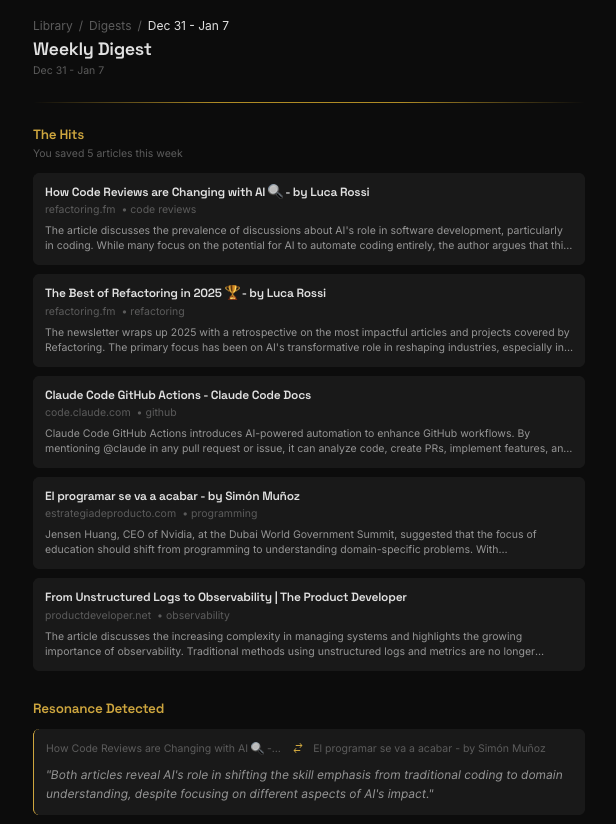 ### Section A: This Week's Saves
A clean summary of everything you saved in the past 7 days:
* Article titles with one-line summaries
* Top tags for quick scanning
* Highlights of the 2-3 most important saves
### Section B: Resonance Detected
**The "Aha!" moment.** This is where the magic happens.
Resona identifies articles that share hidden themes — even if you saved them months apart:
> **"These 2 articles are resonating:"**
>
> **"Building Remote Teams That Actually Work"** (saved Sep 14)
> **"How Jazz Bands Improvise Together"** (saved Nov 8)
>
> *"Both explore coordination without visual cues — synchronizing when you can't see each other. The jazz article's concept of 'listening forward' maps directly to async communication in remote teams."*
These connections exist in your library. You just couldn't see them — until now.
**Explore all connections in Overtones.** Every connection discovered in your digests is also visualized in your [Overtones graph](/features/overtones) — an interactive visualization that shows how your ideas connect over time.
### Section C: Worth Revisiting
1-2 articles from 2-4 weeks ago that are worth a second look. Spaced repetition keeps valuable ideas from fading.
## Delivery Schedule
| Setting | When |
| ------- | ------------------------------- |
| Default | Sunday, 9:00 AM (your timezone) |
| Custom | Choose day and time in Settings |
## Managing Your Digest
Go to [Settings](https://app.useresona.com/settings) to:
* **Enable/disable** the weekly digest
* **Change delivery day** (any day of the week)
* **Change delivery time** (hourly increments)
* **Pause temporarily** without losing preferences
### Section A: This Week's Saves
A clean summary of everything you saved in the past 7 days:
* Article titles with one-line summaries
* Top tags for quick scanning
* Highlights of the 2-3 most important saves
### Section B: Resonance Detected
**The "Aha!" moment.** This is where the magic happens.
Resona identifies articles that share hidden themes — even if you saved them months apart:
> **"These 2 articles are resonating:"**
>
> **"Building Remote Teams That Actually Work"** (saved Sep 14)
> **"How Jazz Bands Improvise Together"** (saved Nov 8)
>
> *"Both explore coordination without visual cues — synchronizing when you can't see each other. The jazz article's concept of 'listening forward' maps directly to async communication in remote teams."*
These connections exist in your library. You just couldn't see them — until now.
**Explore all connections in Overtones.** Every connection discovered in your digests is also visualized in your [Overtones graph](/features/overtones) — an interactive visualization that shows how your ideas connect over time.
### Section C: Worth Revisiting
1-2 articles from 2-4 weeks ago that are worth a second look. Spaced repetition keeps valuable ideas from fading.
## Delivery Schedule
| Setting | When |
| ------- | ------------------------------- |
| Default | Sunday, 9:00 AM (your timezone) |
| Custom | Choose day and time in Settings |
## Managing Your Digest
Go to [Settings](https://app.useresona.com/settings) to:
* **Enable/disable** the weekly digest
* **Change delivery day** (any day of the week)
* **Change delivery time** (hourly increments)
* **Pause temporarily** without losing preferences