> ## Documentation Index
> Fetch the complete documentation index at: https://docs.useresona.com/llms.txt
> Use this file to discover all available pages before exploring further.
# Quickstart
> Get started with Resona in 5 minutes
# Quickstart
Get Resona set up and save your first article in under 5 minutes.
## Step 1: Create an Account
Go to [useresona.com](https://useresona.com) and create your account with email or Google.
Check your inbox and click the verification link.
## Step 2: Install the Browser Extension
1. Visit the [Chrome Web Store](#)
2. Click **Add to Chrome**
3. Pin the extension to your toolbar for easy access
Coming soon
Coming soon
## Step 3: Save Your First Article
1. Navigate to any article you want to save
2. Click the **Resona icon** in your browser toolbar
3. Watch the pulse animation — your article is being processed
Resona extracts the article content and generates summaries, key points, and tags automatically. This takes about 10-30 seconds.
## Step 4: View Your Library
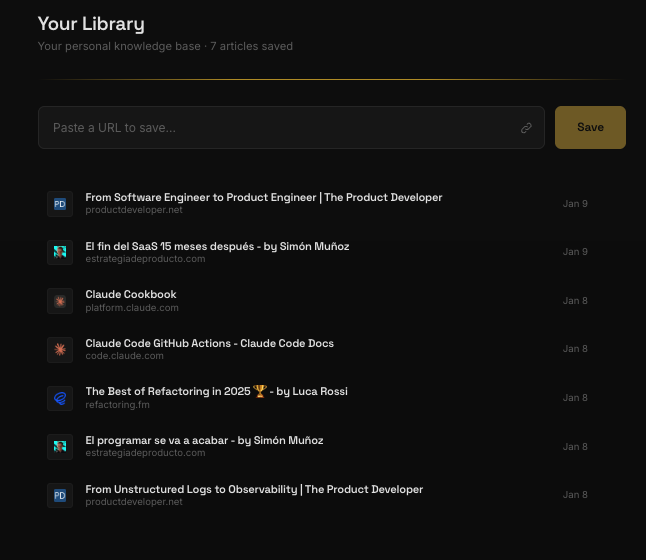
Go to [app.useresona.com/library](https://app.useresona.com/library) to see your saved articles with:
* **Summary** — The core ideas in 2-3 paragraphs
* **Key Points** — Scannable takeaways
* **Notable Quotes** — Memorable lines worth remembering
* **Auto-tags** — Topics for easy filtering
 ## What's Next?
Learn about the AI-powered weekly summary
Chat with everything you've saved
## What's Next?
Learn about the AI-powered weekly summary
Chat with everything you've saved